OpenClaw使用技巧
1. openclaw.json配置参考(密码认证,允许局域网访问Control UI,允许HTTP协议访问Control UI)
文件路径~/.openclaw/openclaw.json
  "gateway": {
    "port": 18789,
    "mode": "local",
    "controlUi": {
      "allowedOrigins": [  # 配置域名访问白名单
        "http://192.168.0.1:18789",
        "https://claw.example.com"
      ],
      "allowInsecureAuth": true  # 允许HTTP协议访问Control UI
    },
    "bind": "lan",  # 允许局域网访问Control UI
    "auth": {
      "mode": "password",  # 启用密码认证
      "token": "29c4f73a9798b050122508fcdd72309db44fec0859857833",
      "password": "Password" # 设置Control UI密码
    },
    "tailscale": {
      "mode": "off",
      "resetOnExit": false,
    }
  },
2. Control UI配置模型,并将模型应用到Agent
配置模型
- 点击Config -> Models,选择Providers,点击Add Entry,将custom-1修改为模型提供商的名称
- 选择Api类型,输入Api Key,Base Url(接口地址)
- 往下Models部分点击Add,Id(模型ID),name(模型名称)
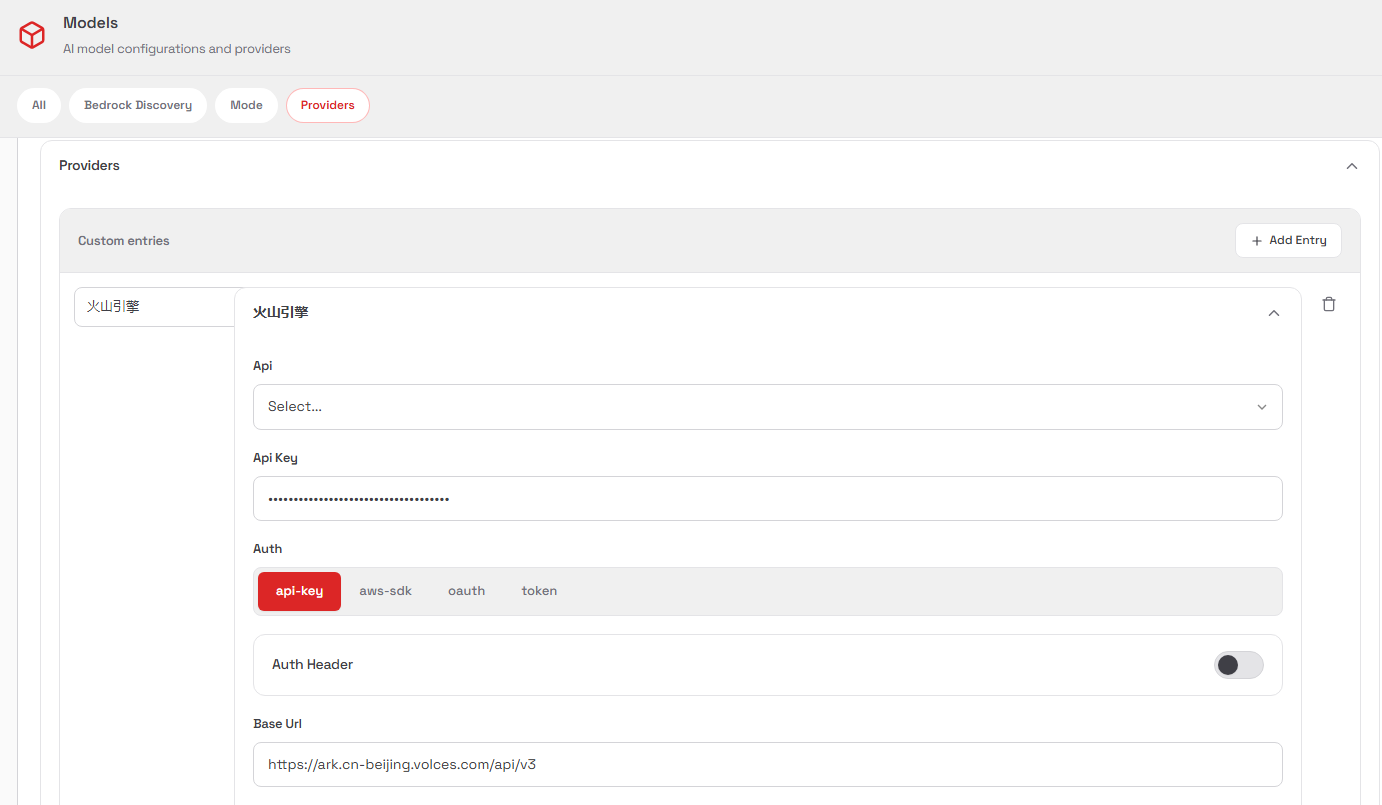
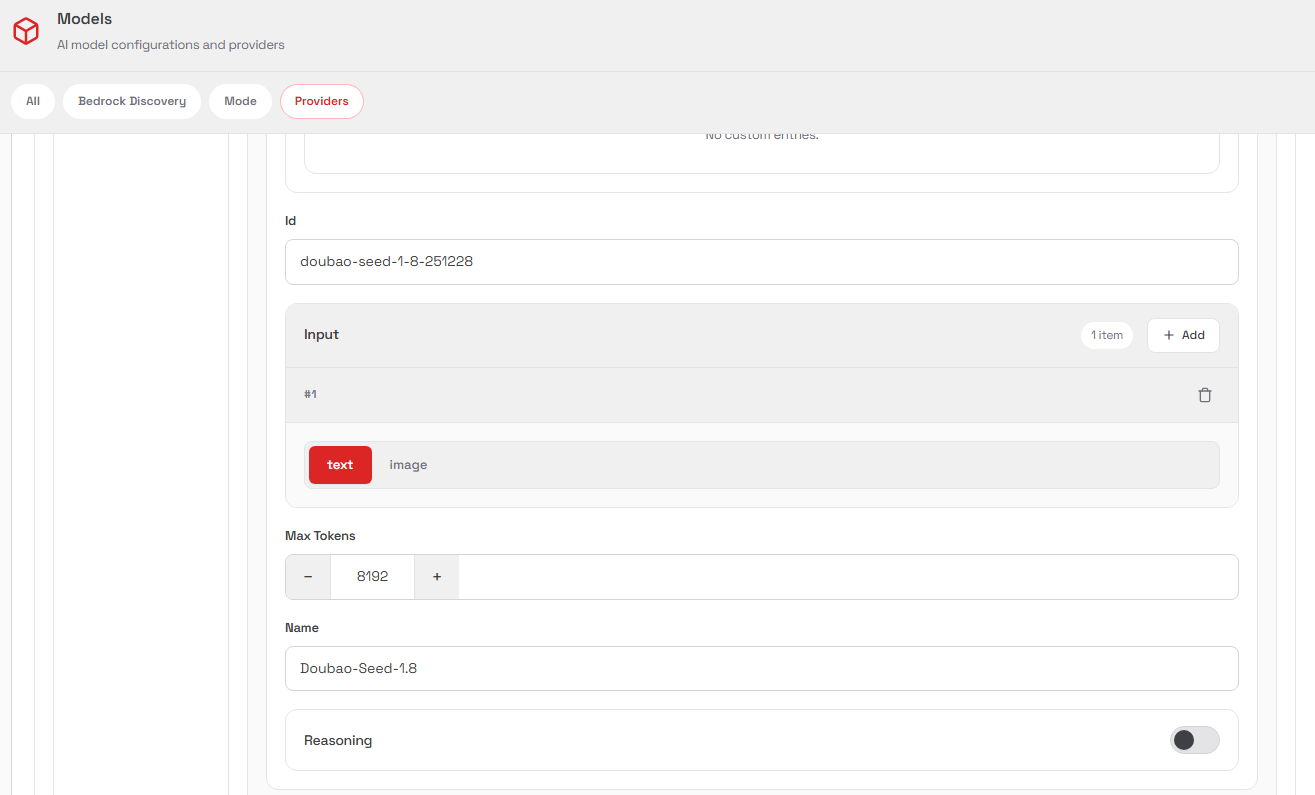
配置文件参考
  "models": {
    "providers": {
      "火山引擎": {
        "baseUrl": "https://ark.cn-beijing.volces.com/api/v3",
        "apiKey": "25abab55-488b-4fd9-9be3",
        "auth": "api-key",
        "api": "openai-completions",
        "models": [
          {
            "id": "doubao-seed-1-8-251228",
            "name": "doubao-seed-1-8-251228",
            "reasoning": false,
            "input": [
              "text"
            ],
            "cost": {
              "input": 0,
              "output": 0,
              "cacheRead": 0,
              "cacheWrite": 0
            },
            "contextWindow": 200000,
            "maxTokens": 8192
          }
        ]
      },
      "火山codeplan": {
        "baseUrl": "https://ark.cn-beijing.volces.com/api/coding/v3",
        "apiKey": "25abab55-488b-4fd9-9be3",
        "api": "openai-completions",
        "models": [
          {
            "id": "ark-code-latest",
            "name": "ark-code-latest",
            "reasoning": false,
            "input": [
              "text"
            ],
            "cost": {
              "input": 0,
              "output": 0,
              "cacheRead": 0,
              "cacheWrite": 0
            },
            "contextWindow": 200000,
            "maxTokens": 8192
          }
        ]
      }
    }
  },
将模型应用到Agents
点击Config ->Agents,在Primary Model填写“模型提供商/模型ID”
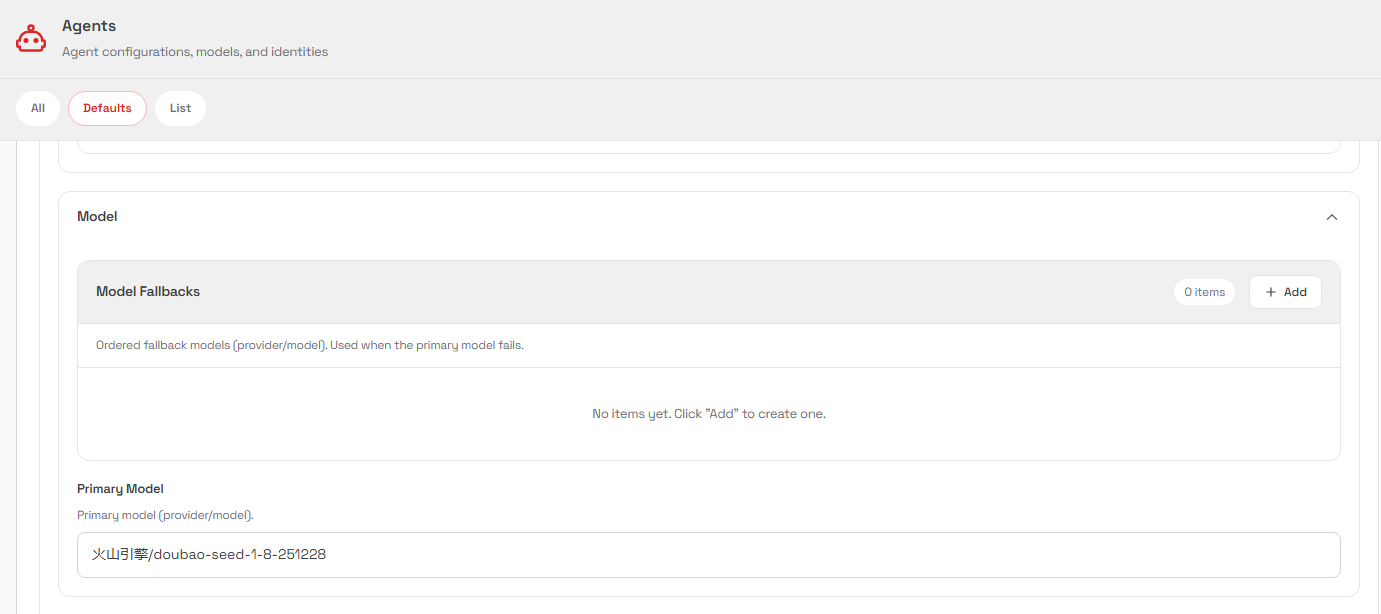
配置文件参考
  "agents": {
    "defaults": {
      "model": {
        "primary": "火山codeplan/ark-code-latest"
      },
      "imageModel": {
        "primary": ""
      },
      "models": {
        "火山codeplan/ark-code-latest": {},
        "火山引擎/doubao-seed-1-8-251228": {}
      },
      "workspace": "/home/openclaw/.openclaw/workspace",
      "timeFormat": "24",
      "compaction": {
        "mode": "safeguard"
      },
      "thinkingDefault": "high",
      "verboseDefault": "off",
      "typingIntervalSeconds": 6,
      "maxConcurrent": 4,
      "subagents": {
        "maxConcurrent": 8
      }
    },
    "list": [
      {
        "id": "main"
      },
      {
        "id": "agent02",
        "name": "agent02",
        "workspace": "/home/openclaw/.openclaw/workspace-agent02",
        "agentDir": "/home/openclaw/.openclaw/agents/agent02/agent"
      }
    ]
  },
3. 在对话中不显示思考过程
在对话框中发送以下指令
/verbose off
/reasoning off
4. 设置思考级别
在对话框中发送以下指令
/t <level>级别(别名):off | minimal | low | medium | high | xhigh(仅 GPT-5.2 + Codex 模型)
5. 多Agent路由(将多个Agent绑定到不同的Channel)
编辑openclaw.json,在agents配置下方增加绑定配置,注意bindings配置不包含在agents配置里面
    "bindings": [
      {
        "agentId": "main",
        "match": {
          "channel": "telegram"
        }
      },
      {
        "agentId": "agent02",
        "match": {
          "channel": "wecom-app"
        }
      }
    ],
完整示例如下
  "agents": {
    "defaults": {
      "model": {
        "primary": "火山引擎/doubao-seed-1-8-251228"
      },
      "imageModel": {
        "primary": ""
      },
      "models": {},
      "workspace": "/home/openclaw/.openclaw/workspace",
      "timeFormat": "24",
      "compaction": {
        "mode": "safeguard"
      },
      "thinkingDefault": "high",
      "verboseDefault": "off",
      "maxConcurrent": 4,
      "subagents": {
        "maxConcurrent": 8
      }
    },
    "list": [
      {
        "id": "main"
      },
      {
        "id": "agent02",
        "name": "agent02",
        "workspace": "/home/openclaw/.openclaw/workspace-agent02",
        "agentDir": "/home/openclaw/.openclaw/agents/agent02/agent"
      }
    ]
  },
    "bindings": [
      {
        "agentId": "main",
        "match": {
          "channel": "telegram"
        }
      },
      {
        "agentId": "agent02",
        "match": {
          "channel": "wecom-app"
        }
      }
    ],
6. 对话报错“400 Total tokens of image and text exceed max message tokens.”
使用指令/new新建对话
7. 检查配置文件语法
执行命令node -e "JSON.parse(require('fs').readFileSync('/home/openclaw/.openclaw/openclaw.json', 'utf8'))"
没有输出信息表示配置语法正确
8. Telegram机器人长时间正在输入后无结果输出,日志报错“typing TTL reached (2m); stopping typing indicator”
禁用输入指示器(两种方法):
使用Control UI修改Agents设置,将Typing Mode设置为“Never”
或者编辑openclaw.json,在agents配置部分增加"typingMode": "never",
9. 设备配对
2026.2.22版本开始第一次访问Control UI需要进行配对,提示:
pairing required
This device needs pairing approval from the gateway host.
按照提示中的命令查看待配对的设备ID,在OpenClaw服务器执行命令允许配对
执行命令openclaw devices list,查看Pending部分待配对设备的Request ID
执行命令openclaw devices approve <requestId>,进行配对
10. 第三方插件:面向中国IM 台的OpenClaw扩展插件集合
https://github.com/BytePioneer-AI/openclaw-china
安装统一包(包含所有渠道)
openclaw plugins install @openclaw-china/channels
openclaw china setup
更新插件
openclaw plugins update channels使用自定义企业微信接口地址(解决企业微信自建应用可信IP的问题)
需自行部署反向代理,反向代理企业微信的接口域名,Nginx反向代理配置见Nginx常用配置
编辑openclaw.json,在wecom-app配置部分enabled参数下方增加以下配置(属于插件的全局配置,不要加到accounts配置里)"apiBaseUrl": "https://qyapi.example.com",
多Agent分流,每个Agent绑定到不同的企业微信自建应用
编辑openclaw.json,在agents配置下方增加绑定配置,注意bindings配置不包含在agents配置里面
  "bindings": [
    {
      "agentId": "agent02",
      "match": {
        "channel": "wecom-app",
        "accountId": "app1"
      }
    },
    {
      "agentId": "agent03",
      "match": {
        "channel": "wecom-app",
        "accountId": "app2"
      }
    }
  ],
将accountId绑定到不同的自建应用
  "channels": {
    "wecom-app": {
      "enabled": true,
      "accounts": {
        "app1": {
          "webhookPath": "/wecom-app1",
          "token": "c2rS3",
          "encodingAESKey": "zemBVd8mMag",
          "corpId": "wwe851e",
          "corpSecret": "TK4Vj5rn",
          "agentId": 1000010,
          "inboundMedia": {
            "enabled": true,
            "maxBytes": 20971520,
            "keepDays": 7
          }
        },
        "app2": {
          "webhookPath": "/wecom-app2",
          "token": "MFLFeT",
          "encodingAESKey": "fOZepsW5eRn",
          "corpId": "wwe851",
          "corpSecret": "FZsIiBxLPUM4iNIQ",
          "agentId": 1000011,
          "inboundMedia": {
            "enabled": true,
            "maxBytes": 20971520,
            "keepDays": 7
          }
        }
      }
    }
  },
多账号共用同一webhookPath / token时,系统会优先按入站消息里的AgentID匹配账号agentId
若仍存在多候选,会记录告警并回退第一个匹配账号
为减少歧义,建议每个账号使用独立的 webhookPath / token / encodingAESKey
11. 一句话,让你的OpenClaw可以全网抓信息
http://xhslink.com/o/66ndYRacJSj
传统的方法让 OpenClaw 上网是折腾搜索工具,API、配置,费劲巴拉,花钱也未必好用。
今天教你一个邪修方式:不搞搜索工具,只用爬虫工具 + URL 转 Markdown 服务,搓一个 skill,OpenClaw 上网又好又快。
其实只需要一句话,在装了 skill-creator 之后,跟你的 OpenClaw 讲:
「现在给我做一个 skill,当我需要上网搜信息的时候,使用这个服务:在网址前面加上 markdown.new/ 会自动显示 markdown 版本,一般用 Cloudflare 的网站都能显示;如果不支持 Cloudflare 的网站,尝试在 URL 前添加 defuddle.md/,也是一样的效果;r.jina.ai/ 做前缀,也是一样。如果实在不行,尝试用这个爬虫工具:github.com/D4Vinci/Scrapling」